New to the series? Start with Part 1 — 5 Signs Your Website Is Costing You Customers.
Let me be upfront about something: this article isn't here to trash WordPress, GoDaddy, or Wix. Millions of businesses use them. They helped an entire generation of small businesses get online, and that matters. For a basic brochure site -- here's who we are, here's what we do, here's how to reach us -- they work fine.
But at some point, your business outgrows "fine." And that's where things get interesting.
1 These Platforms Aren't Bad. They're Limited.
WordPress powers roughly 40% of all websites on the internet. GoDaddy and Wix each serve millions more. If all you need is a homepage, an about page, and a contact form -- you're probably fine right where you are. Honestly.
The problems start when your business needs more than a digital brochure. Email campaigns. Booking systems. Digital waivers. Real analytics. Content you can update yourself without breaking something. That's when these platforms start showing their edges -- not because they're bad, but because your business is asking them to do ten things at once, and they were built to do one.
2 The Template Ceiling
Every one of these platforms starts you off the same way: pick a template. Choose your colors. Upload your logo. Swap in your own text. And for a while, it feels great. You've got a professional-looking website in an afternoon.
But then you want to do something specific. You want a booking form that collects the exact information your business needs -- not a generic "name and email" box. You want an email signup that automatically adds people to a campaign you're running. You want a waiver system for your adventure park or your fitness studio. You want an event calendar that visitors can actually interact with.
And the template says no. Or more accurately, it says "that's not what I was built for."
You can change the colors. You can swap the fonts. You can rearrange some sections. But you can't fundamentally change what the site is capable of doing. That's the template ceiling -- the point where customization ends and capability begins. You can rearrange the furniture, but you can't knock down walls.
What you can do about this: Before you assume you've hit the ceiling, make sure you've actually explored everything your platform offers. Most business owners use about 20% of their platform's features. Check the app marketplace, read the help docs, search for the specific thing you need. You might be surprised. But if you search and the answer is "not possible" or "requires a $50/month add-on" -- that's the ceiling, and now you know where it is.
A template is a pre-built website layout that you customize with your own text, images, and colors. Think of it like a fill-in-the-blank document -- the structure is already decided, and you're filling in the blanks. Templates are great for getting started quickly, but they have built-in limits on what you can change. You can pick different paint colors, but the floor plan is locked.
3 The Plugin Problem
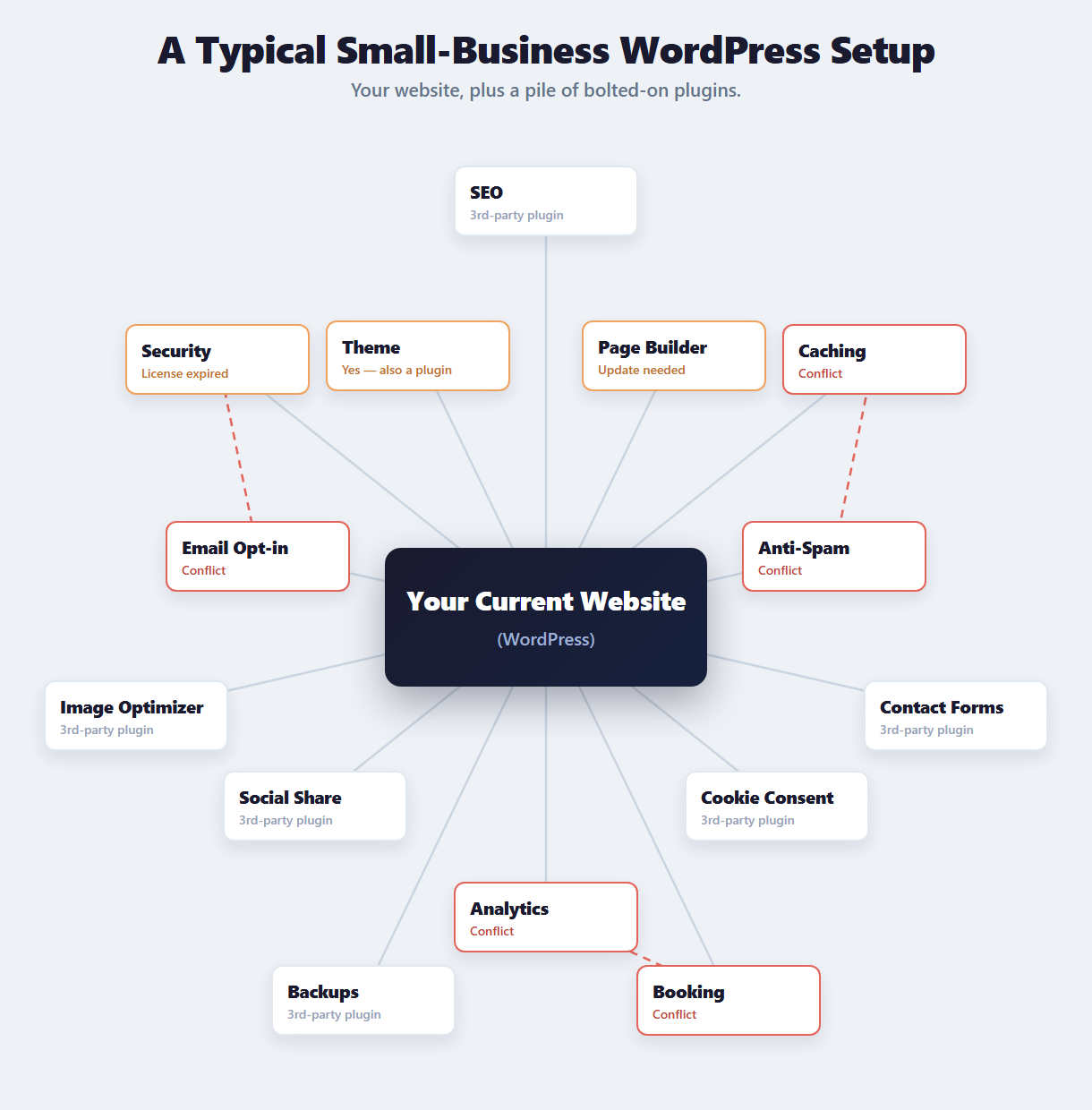
WordPress's answer to the template ceiling is plugins. Need email capture? There's a plugin for that. Need a booking system? Plugin. Need SEO tools? Plugin. Need security? You guessed it -- plugin.
On paper, that sounds incredibly flexible. In practice, it creates a web of dependencies that gets messy fast. Each plugin is built by a different developer, updated on a different schedule, and tested against a different set of other plugins. When two plugins conflict -- and they will -- your site breaks. And figuring out which one caused it is like untangling Christmas lights in the dark.
Then there's the security angle. According to Sucuri's annual website threat report, over 90% of hacked CMS sites run WordPress. That's not because WordPress itself is poorly built. It's because every plugin you install is another door that could be left unlocked. More plugins means more doors. More doors means more risk.
GoDaddy and Wix play a slightly different version of the same game. Instead of "plugins," they call them "apps" or "add-ons" or "integrations." The packaging changes. The core problem doesn't: you're bolting together tools from different sources and hoping they all keep working together.
What you can do about this: If you're on WordPress, audit your plugins right now. Go to your dashboard, look at the list, and ask: when was the last time each one was updated? Are any flagged as incompatible? Are there any you installed years ago and forgot about? Delete anything you're not actively using -- every unused plugin is an unlocked door. For security specifically, at minimum install a reputable security plugin (Wordfence is free) and make sure automatic updates are turned on. It won't eliminate the risk, but it shrinks the surface area.
A plugin is a small piece of software you install on your website to add a feature it doesn't have built in. Think of it like adding an app to your phone. The difference is that websites aren't phones -- plugins can conflict with each other, slow your site down, create security vulnerabilities, and break when they're updated (or when they're NOT updated). A typical WordPress business site runs 20-30 plugins, each one adding complexity and risk.
Here's something most people don't realize: on WordPress, your template itself is a plugin. The theme that controls how your entire site looks is third-party code from an outside developer -- subject to the same conflicts, the same security risks, and the same risk of being abandoned as every other plugin on your site. The very foundation of your design is a dependency you don't control.
"Every plugin you add is a feature someone else controls, updated on someone else's schedule, secured by someone else's standards."
4 Can Your Website Do These 8 Things?
Here's where we get practical. Forget platform names for a minute. Forget WordPress vs. Wix vs. anything else. The only question that actually matters is this: can your website do what your business needs it to do?
Here are 8 capabilities that a business website should have in 2026. Read through the list and honestly check off the ones your current site handles:
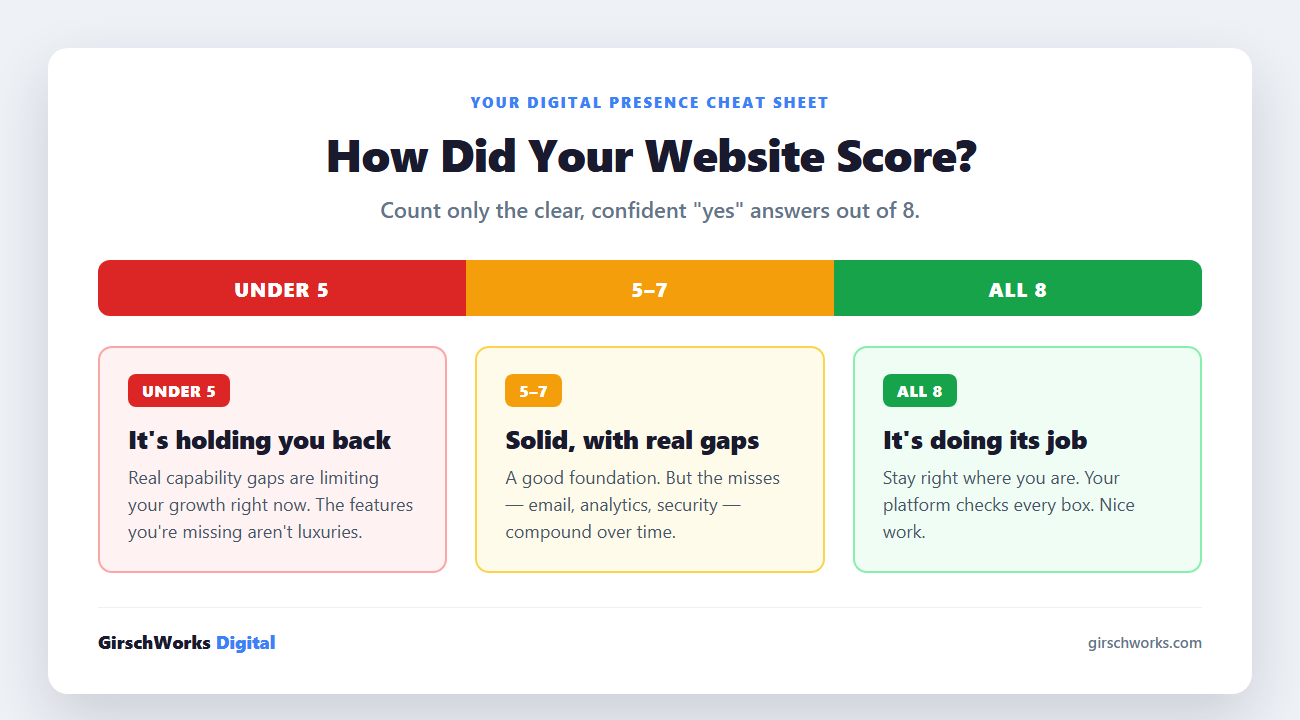
Run through that checklist honestly. Don't count "sort of" or "I think so" -- count clear, confident "yes" answers only. Write down your number. We'll talk about what it means in the next section.
5 How to Read Your Results
All 8? Your platform is doing its job. Seriously -- stay where you are. If your current setup checks every box, there's no reason to change a thing. You've either got a great custom build or you've invested the time to make your platform work at full capacity. Either way, nice work.
5 to 7? You've got a solid foundation with some real gaps. Those missing capabilities aren't just nice-to-haves -- they're things your competitors might already have. It's worth thinking about whether your current platform can close those gaps, or whether you've hit its ceiling. Pay attention to which specific items you're missing. If it's email integration, analytics, or security -- those are the ones that compound over time.
Under 5? Your website has real capability gaps that are likely limiting your growth right now. This doesn't mean you picked the wrong platform three years ago -- it means your business has evolved past what the platform can offer. The features you're missing aren't luxuries. They're the tools that turn a website from a digital business card into something that actually works for you every single day.
The question isn't whether your platform is cheap enough. It's whether it can do what your business actually needs. If the answer is no, the platform is the bottleneck.
Everything on That Checklist — Without Getting Trapped Again.
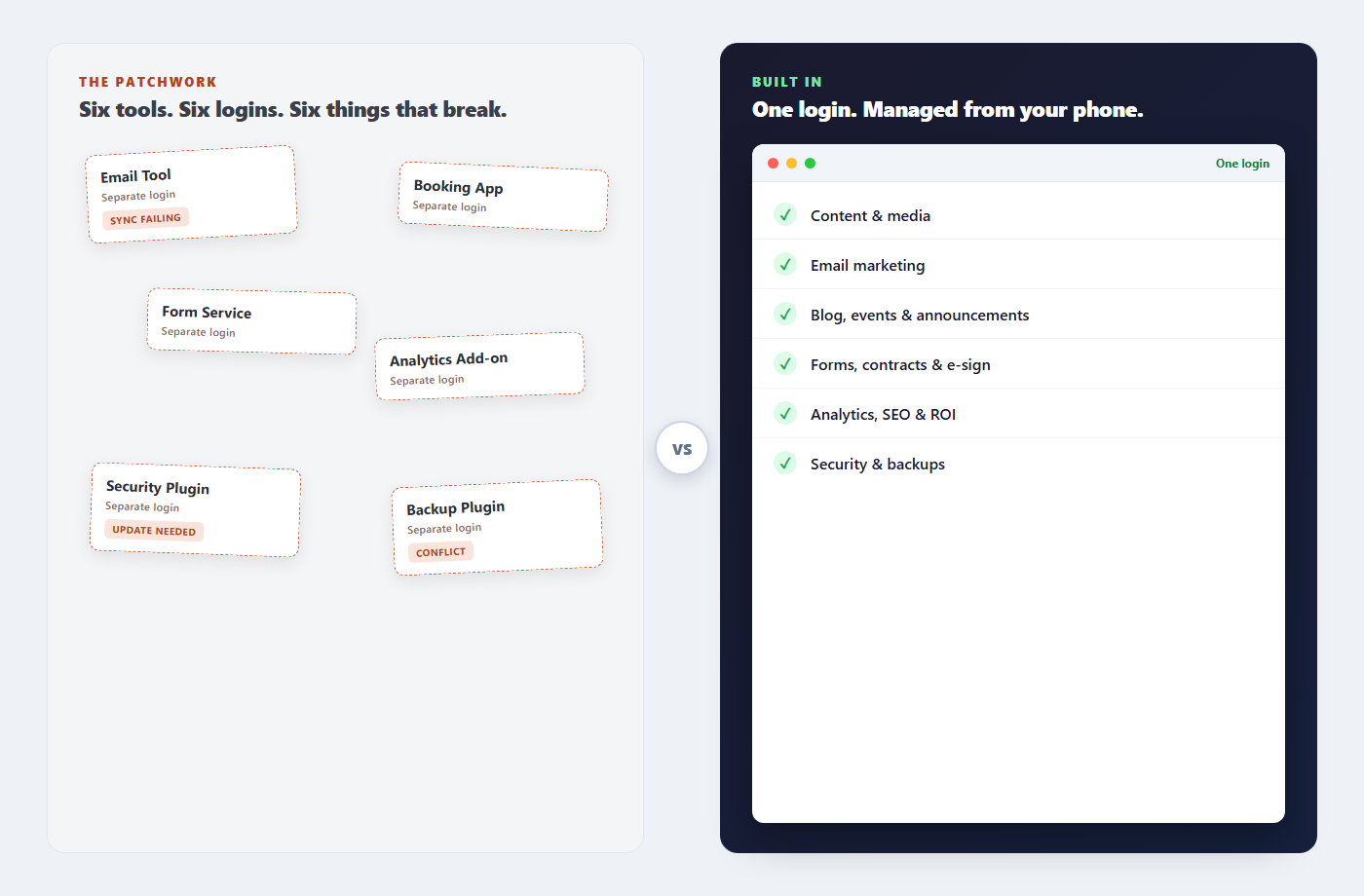
If you came up short, here's the difference. I build your site custom -- yours to own, never locked inside a platform you can't leave. Then every capability on that list is handled for you, from one dashboard you can run right from your phone:
✓ Can't edit your own content? A dashboard and client portal you actually control -- text, photos, your whole media library -- from your phone.
✓ Email capture disconnected from campaigns? Opt-in forms, lists, and campaigns in one place -- plus the automatic emails your site sends behind the scenes.
✓ No blog, events, or announcements? Publish blog posts, list events, and push announcements yourself, in minutes.
✓ Forms and waivers stuck on third-party tools? Contact forms, booking forms, digital waivers -- even contracts and e-signatures -- built into your site.
✓ Flying blind on data? Your own analytics -- site traffic, email performance, SEO insight, even an ROI calculator -- reviewed together on monthly calls.
✓ Managing your own security? No plugins to patch. Security and automatic backups handled for you, secure by default.
✓ Waiting weeks for changes? Me, on retainer. One call, text, or a request in your portal -- done in 24-48 hours.
✓ Broken on mobile? Your site works flawlessly on every device -- and you manage all of it from your phone, too.
And here's what no plugin can give you: your site is custom-built and yours to keep. No lock-in, no patchwork. If you ever leave, you walk away with a clean, modern website — not a pile of plugins you can't untangle.
If your current setup can't check every box on that list, let's build one that can.
Or call/text anytime: (330) 303-1555