Let's skip the preamble. You're a business owner. Your time is worth more than reading someone's backstory. Here are 5 signs your website is costing you customers -- and exactly what to do about each one.
1 Nobody Can Find You on Google
Right now, someone in your city is searching for exactly what you sell. They're typing something like "toy store near me" or "best pizza in Medina" or "landscaper in Akron." If your business doesn't show up on that first page of results, you're invisible to that person. They're going to your competitor instead.
This isn't a tech problem. It's a revenue problem. Every day your site doesn't show up is a day your competitor gets customers that should have been yours.
- Open Google on your phone (not your computer -- your phone).
- Search for "[what you do] + [your city]" -- for example, "toy store Medina Ohio."
- Scroll through the first page. Are you there?
- If not, try searching your exact business name. If even THAT doesn't bring up your website, there's a serious problem.
If your business didn't show up, don't panic -- but do take it seriously. Google isn't hiding you on purpose. Your website just isn't giving Google what it needs to know you're relevant.
How to start fixing this: Make sure your website clearly says what you do, where you're located, and what areas you serve -- in actual text, not just in images. Google can't read a photo. It needs words. Add your city name, your service type, and your neighborhood to your homepage. Set up a free Google Business Profile if you haven't already (we cover this in detail in Part 7). And make sure every page on your site has a unique title and description that matches what people are actually searching for.
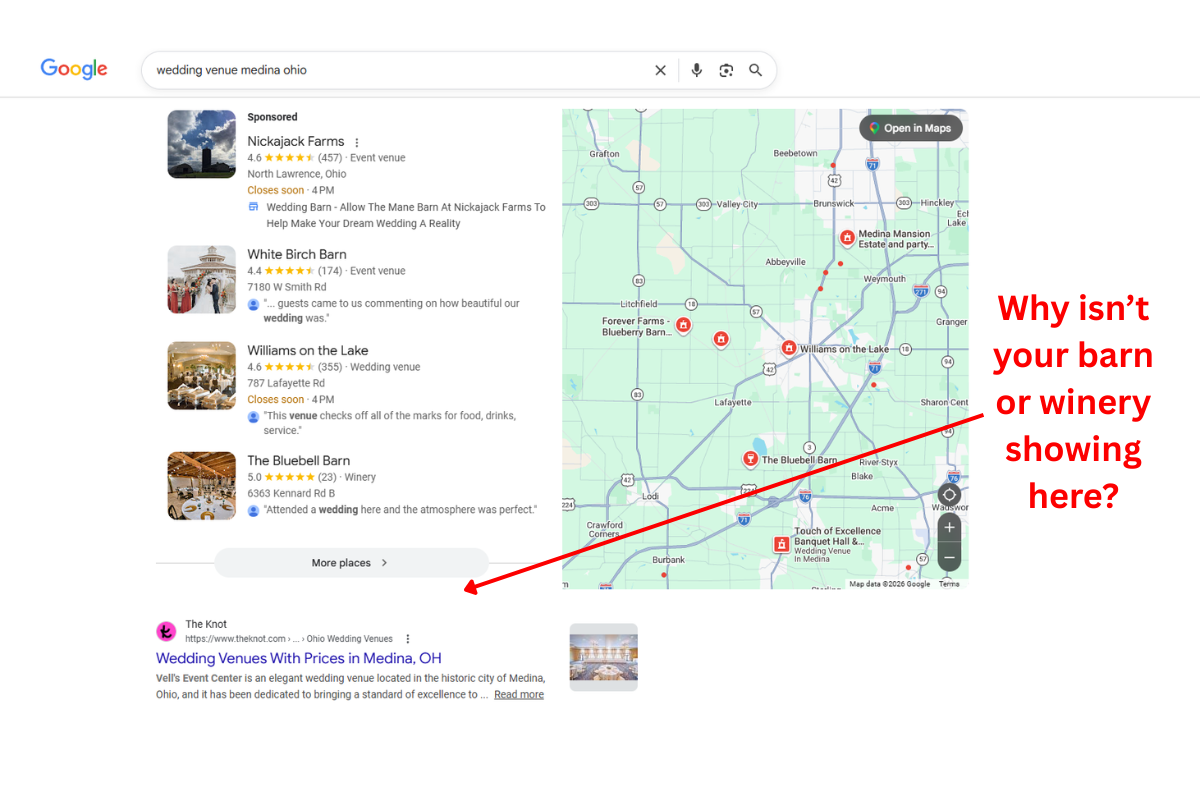
When someone Googles something, Google shows them a list of websites it thinks are the most helpful answer. The first page shows roughly 10 results. Pages 2, 3, 4... exist, but almost nobody clicks past page 1. "Ranking" means showing up on that first page. The higher you are, the more people click. If you're not on page 1, for most people, you don't exist.
2 Your Site Looks Broken on a Phone
Over 60% of all Google searches happen on a phone. Not a laptop. Not a desktop. A phone. If your website is hard to read, slow to load, or awkward to navigate on a phone screen, more than half of your potential customers are leaving before they even see what you offer.
And they're not coming back. They're going to the next result that loads faster and looks better on their screen.
How to start fixing this: If your site isn't mobile-friendly, this is the single highest-impact fix you can make. Most modern website builders have responsive templates -- make sure yours is using one. Test your site on multiple phones, not just yours. If you built your site more than 5 years ago, it almost certainly needs a mobile overhaul. Google actually uses the mobile version of your site as the primary version for ranking -- so if mobile is broken, your desktop rankings suffer too.
- Pull out your phone and open your own website.
- Can you read the text without zooming in?
- Can you tap the buttons without accidentally hitting the wrong one?
- Does the menu work? Can you find your hours, your address, your phone number in under 5 seconds?
- How long did it take to load? If you waited more than 3 seconds, so did your customers.
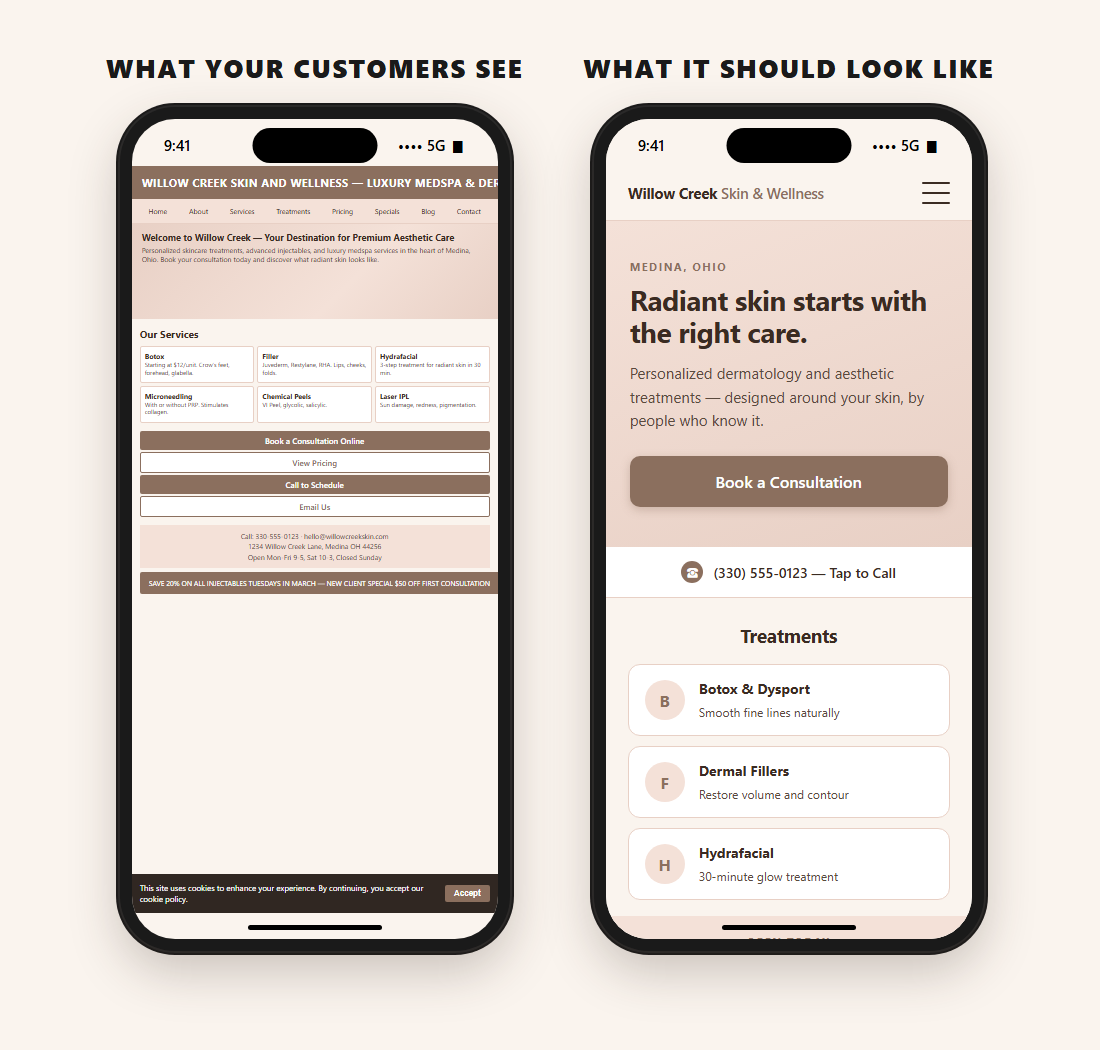
A responsive website automatically adjusts its layout based on the screen size. On a big monitor, you see the full layout. On a phone, the same content reorganizes itself to be readable and tappable. It's not a separate "mobile site" -- it's one site that's smart enough to adapt. If your site was built more than 5-6 years ago, there's a good chance it isn't responsive.
"If your website doesn't work on a phone, it doesn't work for most of your customers."
3 Visitors Leave and You Have No Way to Follow Up
This one is the silent killer. Someone finds your website. They look around. They like what they see. But they're not ready to buy today -- maybe they're just researching, or they got distracted, or they're comparing you to a competitor.
They close the tab. And they're gone. Forever.
If your website doesn't have a way to capture that person's email address -- a signup form, a newsletter, a "get notified about sales" button, anything -- you just lost a potential customer with zero chance of ever reaching them again.
How to start fixing this: Add an email signup form to your website. It can be as simple as a box that says "Get notified about new arrivals" or "Join our mailing list for exclusive deals." Put it on your homepage, your footer, or both. The key is giving visitors a reason to hand over their email -- a discount, early access, useful updates. Then actually send them something worth reading. One email a month is enough to stay top of mind.
An email list is the most valuable marketing asset a small business can own. Social media followers aren't yours -- the algorithm decides who sees your posts. But every email address on your list? That's a direct line to a real person who raised their hand and said "yes, I'm interested."
- Open your website.
- Look for any way a visitor can give you their email address. A signup form, a newsletter box, a "join our mailing list" link -- anything.
- If you can't find one, neither can your customers.
- Bonus: if you DO have one, when was the last time someone actually signed up through it?
An opt-in is simply a place on your website where visitors can enter their email address to hear from you. It could be a popup, a form at the bottom of the page, or a banner that says "Get 10% off your first order." The key is that the customer chooses to sign up -- you're not buying a list or spamming strangers. That's why opt-in email lists have much higher open rates and conversion rates than purchased lists.
4 You Have No Idea How Many People Visit Your Site
Quick question: how many people visited your website last month?
If you don't know the answer, you're running your online presence blind. You wouldn't run your business without looking at your sales numbers. Your website deserves the same attention.
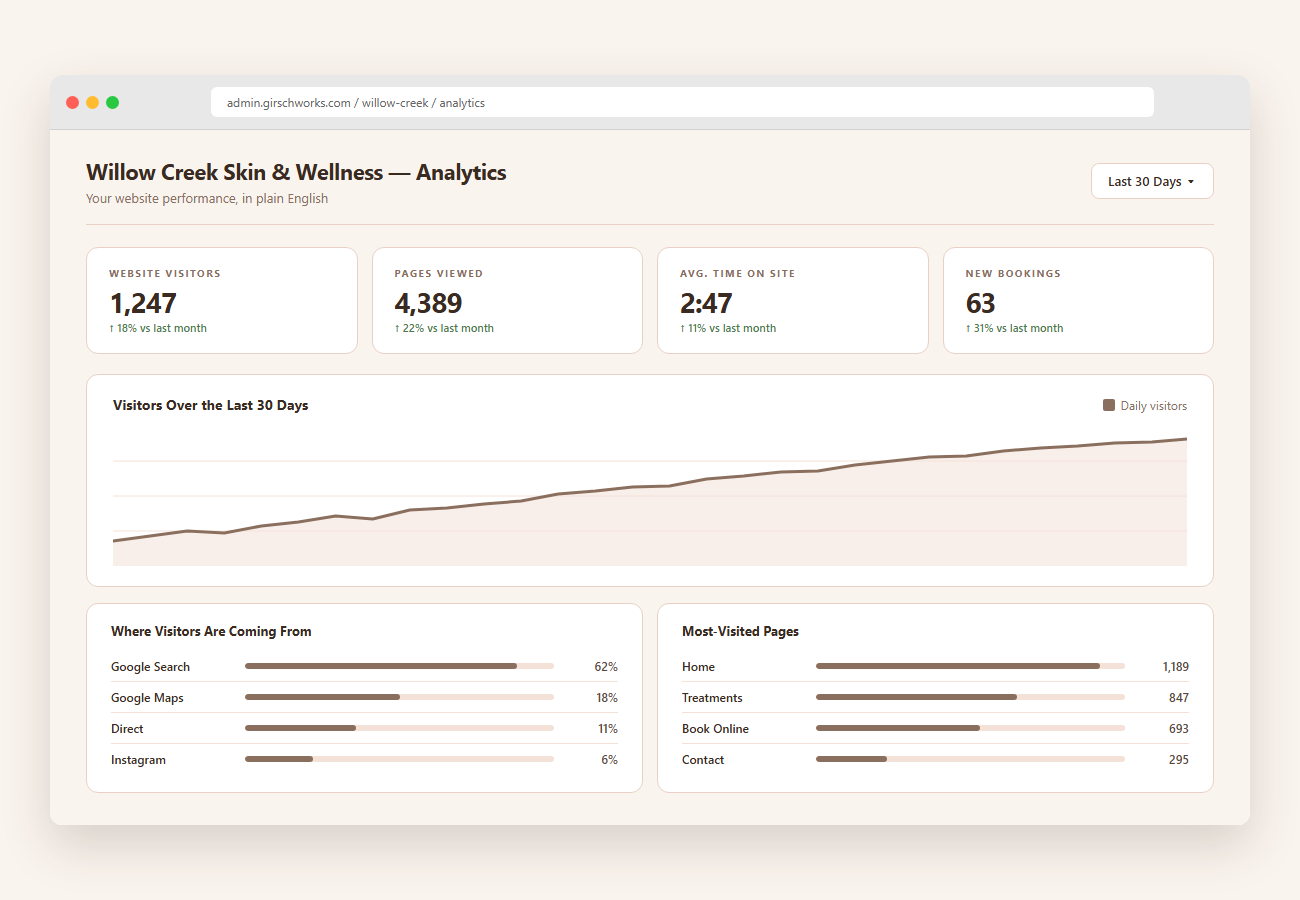
Without analytics, you can't answer basic questions: Is anyone actually visiting? Which pages do they look at? How did they find you -- Google, Facebook, a link someone shared? Where do they drop off? These answers are the difference between guessing and growing.
How to start fixing this: At minimum, set up Google Analytics -- it's free. You'll need to add a small tracking code to your website (your hosting provider's help docs will show you how, or ask whoever manages your site). Once it's running, check it at least once a month. Look at three things: how many visitors you're getting, where they're coming from, and which pages they spend the most time on. That alone tells you more than most business owners ever know about their website.
But here's the real secret the pros won't tell you: Google Analytics alone isn't enough. It tells you what happened but not always why. The best setups run Google Analytics alongside a custom analytics dashboard that tracks the specific things that matter to your business -- form submissions, email signups, booking clicks, which pages actually convert visitors into customers. And the data is only useful if someone reviews it with you regularly and helps you act on it. A monthly phone call to walk through the numbers, talk about what's working, and plan next steps turns raw data into actual growth strategy.
- Ask yourself: do I have Google Analytics (or any analytics tool) installed on my website?
- If yes, when was the last time you looked at it?
- If you're not sure, or the answer is "I don't know," that's a sign. Your website is generating data every day -- and nobody's looking at it.
Google Analytics is a free tool from Google that tracks who visits your website and what they do. It tells you how many visitors you got, which pages they looked at, how long they stayed, what device they used, and where they came from (Google search, social media, a direct link, etc.). It requires a small piece of code added to your website -- once it's there, it runs automatically in the background. You just check the dashboard whenever you want to see how your site is performing.
You can't improve what you can't measure. Analytics aren't optional for a business website -- they're the difference between hoping your website works and knowing it does.
5 Your Site Hasn't Been Updated in Months
When was the last time you changed anything on your website? Not the last time you thought about it -- the last time something actually changed.
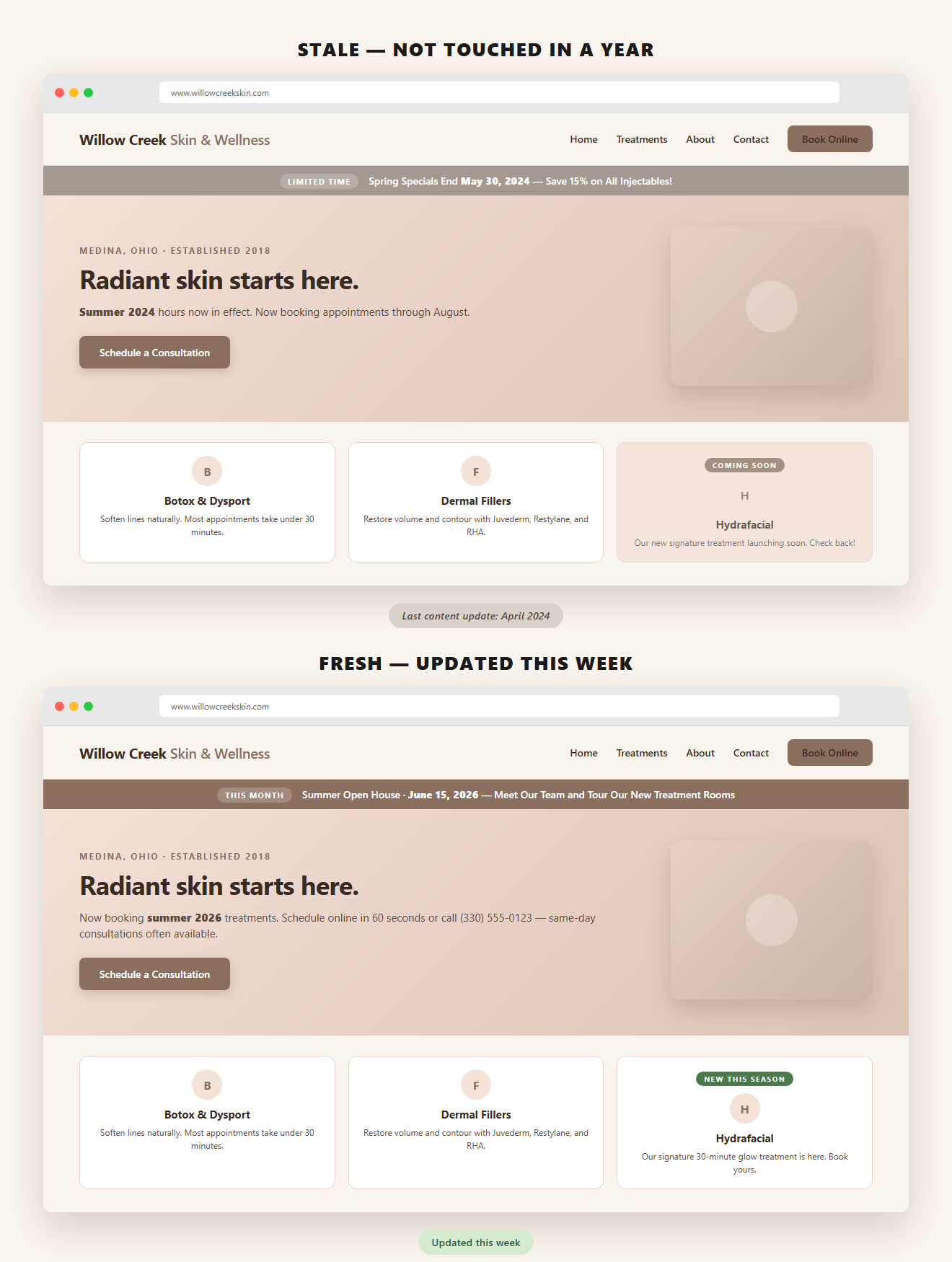
If your site still says "Open for the 2024 season" or shows last year's menu or has an event listed from six months ago, that's what your customers see. And here's what they think: "Is this place still open?"
Google thinks the same thing. Google rewards websites that are actively maintained with fresh content. A site that hasn't been touched in a year tells Google this business might not be active, and it gets pushed down in search results.
Here's the real problem though: most business owners don't update their site because updating it is hard. You have to log into some confusing dashboard, figure out where the text lives, hope you don't break the layout, and then wonder if the change actually went live. If updating your website feels like a chore, the platform is failing you -- not the other way around.
How to start fixing this: Set a calendar reminder once a month to update one thing on your site. Change a photo. Update your hours for the season. Add a line about something new you're offering. It takes 10 minutes and it signals to both Google and your customers that you're active and paying attention. If your platform makes even that difficult, that's a sign the platform itself is the problem.
Even if your hours, prices, and services haven't changed, your website still needs signs of life. A new photo. A seasonal update. A short post about something happening this month. It doesn't have to be a big project -- it just has to be recent. Think of your website like a storefront window. If the display hasn't changed in a year, people walk by.
Same site. Same business. The only thing that changed is whether the content's been touched in a year.
- Open your website and look at it like a stranger would.
- Is there any date visible on the page? Is it current?
- Are your hours accurate? Is your menu or service list up to date?
- When was the last time a photo was added or a piece of text was changed?
- If a customer called you and said "is this information still accurate?" -- would you be confident saying yes?
Google treats your website like a resume. If it hasn't been updated, it assumes you've moved on. Your customers make the same assumption.
So... How Did Your Website Score?
If you found 2 or 3 of these on your own site, you're in good company -- most small business websites have at least that many issues. The important thing is that now you know what to look for.
Everything in this article is something you can start working on yourself. Check your Google ranking. Pull up your site on your phone. Look for that email signup form. Set up analytics. Update your content. These are real, concrete steps you can take today.
But if you looked at that list and thought "I don't have time for this" or "I don't know where to start" -- that's completely normal too. Running a business is already a full-time job. You shouldn't have to become a web developer on top of it.
Every problem on this list? My platform solves it.
✓ Can't be found on Google? Built-in SEO so your site actually shows up.
✓ Broken on mobile? Responsive design that works flawlessly on every device.
✓ Losing visitors with no follow-up? Email capture and marketing campaigns running from the same system.
✓ Flying blind on data? Google Analytics plus a custom-built dashboard -- and monthly strategy calls to review the numbers together.
✓ Site collecting dust? A content editor you can actually use -- plus a developer on retainer who keeps it fresh.
No plugins. No patchwork of third-party tools. Everything built in, everything maintained by the same person who answers your phone calls.
Or call/text anytime: (330) 303-1555